> For the complete documentation index, see [llms.txt](https://docs.base.meme/llms.txt). Markdown versions of documentation pages are available by appending `.md` to page URLs; this page is available as [Markdown](https://docs.base.meme/using-base.meme/detailed-creation/advanced-creation.md).
# Advanced Mode Creation
Advanced mode is a two-step creation flow for creators who want more control over the launch parameters. All advanced settings are fixed once the coin is created and can’t be edited later.
## Step-by-step guide
### Step 1: Basic info
Fill in the coin details (name, ticker, description, media), then click **Next Step**.

On the right side, **Bonding Curve Preview** shows an estimated `Starting MC` and `Graduation MC` (Market Cap) for reference.
### Step 2: Advanced options
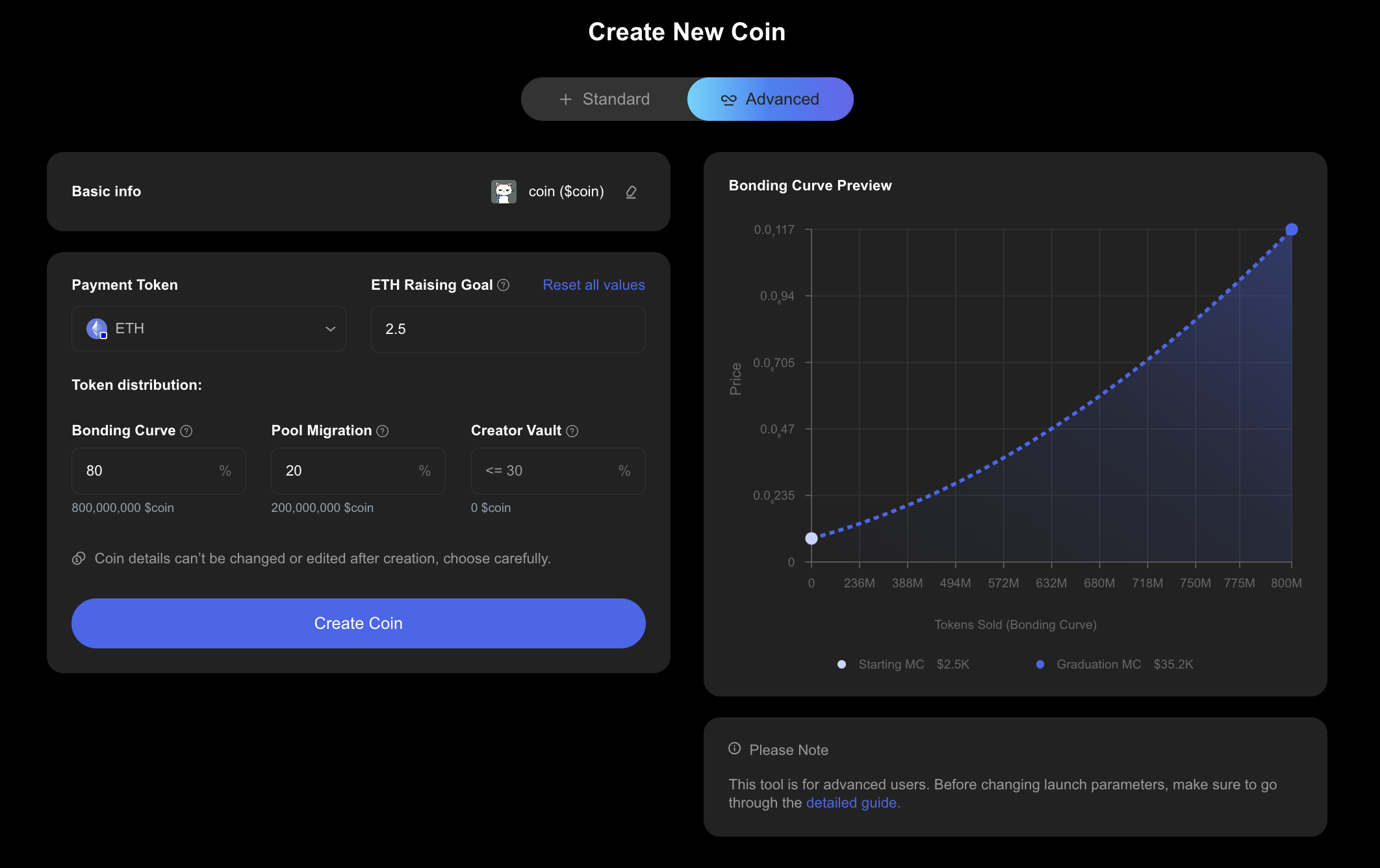
Configure the launch parameters, then click **Create Coin**.
You can also use **Reset all values** to revert the advanced settings back to the defaults for the selected payment token.
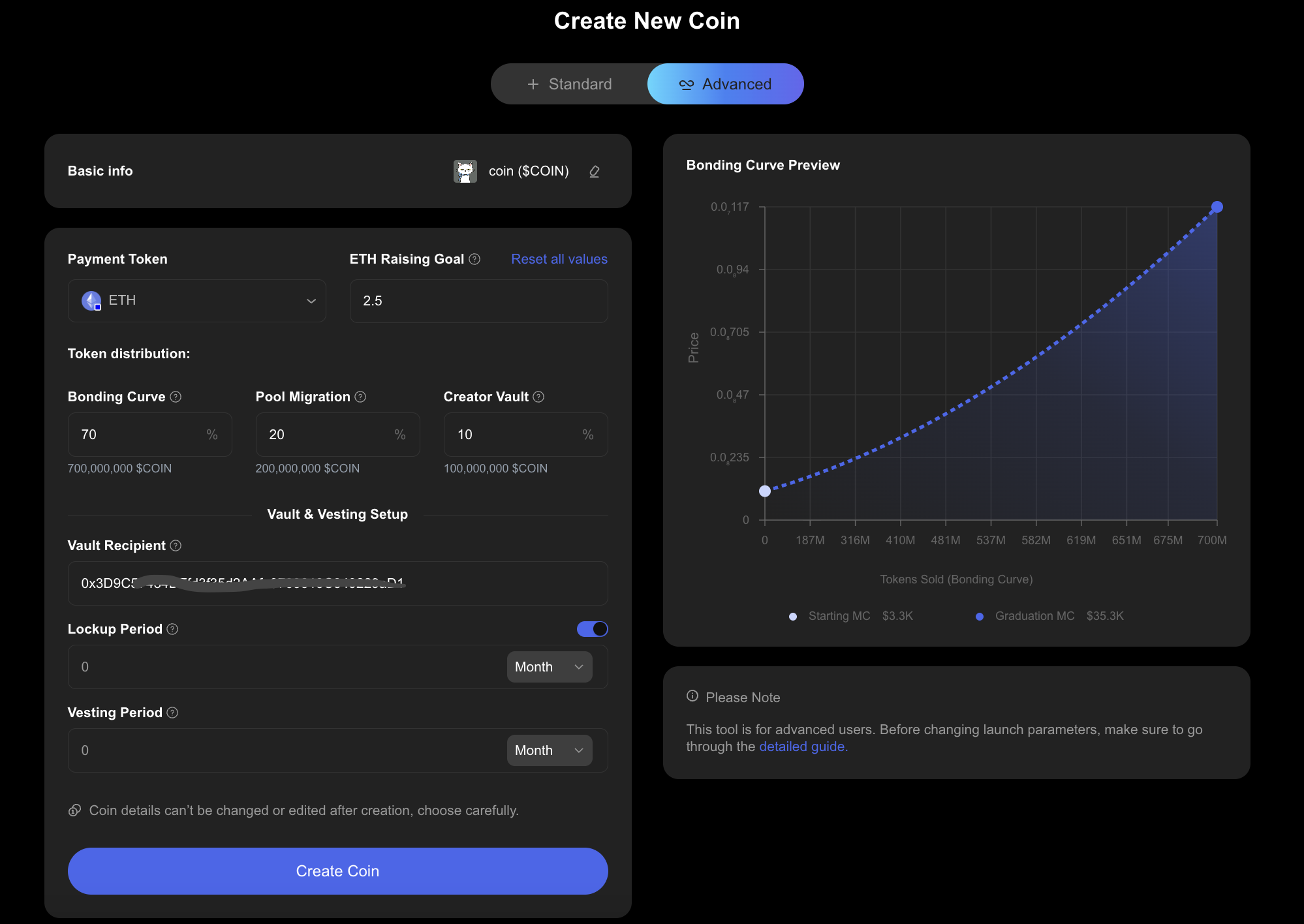
As you adjust `Raised` and the token distribution, the **Bonding Curve Preview** will update (including `Starting MC` and `Graduation MC`) to help you visualize the launch.
Note: Coin details and advanced settings can’t be changed or edited after creation, choose carefully.
## Field reference
### Coin Name
The name of your coin as displayed across Base.meme.
### Ticker Symbol
Your coin’s ticker (for example, `PEPE`). This is used to identify your coin when trading.
### Description (optional)
A short description of the coin. This is shown on the coin page and helps traders understand what the coin is about.
### Social links (optional)
Links to your project’s social accounts (for example X / Telegram / Website). These appear on the coin page to help your community find the official channels.
### Media
Upload a cover image or video for your coin.
* Supported formats: JPG, PNG, GIF, MP4
* Max size: 2GB
### Advanced options
#### Payment Token
Select the payment token that backs the coin (for example ETH, USDC, or SOL). The `Raising Goal` value is denominated in this token.
#### Raising Goal (Funding Target)
`Raising Goal` is the amount of the selected payment token that must be collected before triggering graduation and migrating liquidity to the AMM.
* **Range:** must be between **50%** and **100×** of the default `Raising Goal` value for the selected payment token.
* **Example (ETH):** minimum is **1.25 ETH**.
#### Token distribution
Token distribution controls how the total token supply is split between the sale and post-graduation liquidity, with an optional vesting option.
* `Bonding Curve`: set the amount of tokens sold on the bonding curve (**min 50%**, **max 80%**).
* `Pool Migration`: fixed at **20%**. Remaining tokens (after vesting, if any) will be migrated to the Uniswap pool upon graduation.
* `Creator Vault`: allocate a portion of the supply to be locked and released over time after graduation (**0% to 30%**). Vested tokens are not sold on the bonding curve.
Note: The percentages must add up to 100%. Since `Pool Migration` is fixed at 20%, the `Bonding Curve` + `Creator Vault` total must equal 80%.
Vesting lets you lock a portion of the token supply and release it gradually over time. Vested tokens are reserved for the vesting recipient and are not sold on the bonding curve. After the coin graduates and migrates liquidity, vesting begins (optionally after lockup duration) and continues until the full vesting duration completes.
#### Creator Vault settings
Vesting settings are only shown when `Creator Vault` is greater than 0%. If `Creator Vault` is set to 0%, the Vault & Vesting Setup fields will be hidden.
When vesting is enabled, configure:
* `Vault Recipient`: the address that will receive the vested tokens. Defaults to the creator wallet address.
* `Vesting Period`: The number of days it takes for locked tokens to be released linearly after the lockup period ends.
* `Lockup Period` (optional): The number of days tokens remain locked after migration before vesting start.
Vesting starts after graduation (migration) and any configured lockup period, then releases tokens gradually over the vesting duration.
#### Tax Configuration (optional)
Configure an optional token tax that is charged on every transfer and trade. Tax parameters are fixed at creation and cannot be changed afterward.
* **Tax Rate**: The percentage charged on each transfer and trade (default 0%). Setting this to 0% disables the tax feature.
* **Distribution Split**: Allocate the collected tax across four channels:
* **Funds Recipient** — direct revenue to a designated wallet (or to a Vault, see below).
* **Holder Dividend** — proportional distribution to all token holders.
* **Token Burn** — buyback and burn to reduce circulating supply.
* **Add to Liquidity** — routes tax back into the Uniswap V2 liquidity pool.
* **Funds Recipient Address**: The wallet that receives the Funds Recipient share. Defaults to the creator wallet.
For full details on how Tax works, see the [Tax Token](/fees-rewards/tax-token.md) page.
#### Vault Type
When Tax is enabled, you can optionally select a **Vault** to automatically manage the tax revenue routed to the **Funds Recipient** channel. Instead of sending those funds to a single wallet, the Vault deploys a strategy contract that takes the Funds Recipient's place. The available Vault types are:
* **SnowBall** — All tax revenue is used for continuous buyback & burn, creating pure deflation. [Learn more](/vaults/snowball.md)
* **BurnDividend** — Starts with buyback & burn, then transitions to a dividend model when the first holder burns tokens. Burners earn a proportional share of future tax revenue. [Learn more](/vaults/burndividend.md)
* **Gift** — A designated X (Twitter) account controls where tax revenue goes. Requires posting a management tweet at least once every 7 days; otherwise falls back to buyback & burn. [Learn more](/vaults/gift.md)
* **Split** — Tax revenue is automatically distributed among up to 10 recipients based on pre-configured percentage shares. [Learn more](/vaults/splitvault.md)
The Vault type is fixed at creation and cannot be changed afterward. For a full overview, see the [Vaults](/vaults.md) page.